main at
the top, followed by a level of functions which are called from main,
etc..
In C++ the relationship between code and data is also frequently defined in terms of dependencies among classes. This looks like composition (see section 7.3), where objects of a class contain objects of another class as their data. But the relation described here is of a different kind: a class can be defined in terms of an older, pre-existing, class. This produces a new class having all the functionality of the older class, and additionally defining its own specific functionality. Instead of composition, where a given class contains another class, we here refer to derivation, where a given class is or is-implemented-in-terms-of another class.
Another term for derivation is inheritance: the new class inherits the functionality of an existing class, while the existing class does not appear as a data member in the interface of the new class. When discussing inheritance the existing class is called the base class, while the new class is called the derived class.
Derivation of classes is often used when the methodology of C++ program development is fully exploited. In this chapter we first address the syntactic possibilities offered by C++ for deriving classes. Following this we address some of the specific possibilities offered by class derivation (inheritance).
As we have seen in the introductory chapter (see section 2.4), in the object-oriented approach to problem solving classes are identified during the problem analysis. Under this approach objects of the defined classes represent entities that can be observed in the problem at hand. The classes are placed in a hierarchy, with the top-level class containing limited functionality. Each new derivation (and hence descent in the class hierarchy) adds new functionality compared to yet existing classes.
In this chapter we shall use a simple vehicle classification system to build a
hierarchy of classes. The first class is Vehicle, which implements as its
functionality the possibility to set or retrieve the mass of a vehicle. The
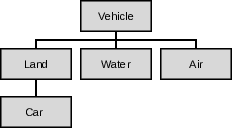
next level in the object hierarchy are land-, water- and air vehicles.
The initial object hierarchy is illustrated in Figure 15.
This chapter mainly focuses on the technicalities of class derivation. The distinction between inheritance used to create derived classes whose objects should be considered objects of the base class and inheritance used to implement derived classes in-terms-of their base classes is postponed until the next chapter (14).
Inheritance (and polymorphism, cf. chapter 14) can be used with classes and structs. It is not defined for unions.
Car is a special case of a Land vehicle, which in turn is a
special case of a Vehicle.
The class Vehicle represents the `greatest common divisor' in the
classification system. Vehicle is given limited functionality: it can
store and retrieve a vehicle's mass:
    class Vehicle
    {
        size_t d_mass;

        public:
            Vehicle();
            Vehicle(size_t mass);

            size_t mass() const;
            void setMass(size_t mass);
    };
Using this class, the vehicle's mass can be defined as soon as the corresponding object has been created. At a later stage the mass can be changed or retrieved.
To represent vehicles traveling over land, a new class Land can be
defined offering Vehicle's functionality and adding its own specific
functionality. Assume we are interested in the speed of land vehicles and
in their mass. The relationship between Vehicles and Lands could of
course be represented by composition but that would be awkward: composition
suggests that a Land vehicle is-implemented-in-terms-of, i.e.,
contains, a Vehicle, while the natural relationship clearly is that
the Land vehicle is a kind of Vehicle.
A relationship in terms of composition would also somewhat complicate our
Land class's design. Consider the following example showing a class
Land using composition (only the setMass functionality is shown):
    class Land
    {
        Vehicle d_v;        // composed Vehicle
        public:
            void setMass(size_t mass);
    };

    void Land::setMass(size_t mass)
    {
        d_v.setMass(mass);
    }
Using composition, the Land::setMass function only passes its
argument on to Vehicle::setMass. Thus, as far as mass handling is
concerned, Land::setMass introduces no extra functionality, just extra
code. Clearly this code duplication is superfluous: a Land object is a
Vehicle; to state that a Land object contains a Vehicle is at
least somewhat peculiar.
The intended relationship is represented better by inheritance.
A rule of thumb for choosing between inheritance and composition
distinguishes between is-a and has-a relationships. A truck is a
vehicle, so Truck should probably derive from Vehicle. On the other
hand, a truck has an engine; if you need to model engines in your system,
you should probably express this by composing an Engine class inside the
Truck class.
Following the above rule of thumb, Land is derived from the base class
Vehicle:
    class Land: public Vehicle
    {
        size_t d_speed;
        public:
            Land();
            Land(size_t mass, size_t speed);

            void setSpeed(size_t speed);
            size_t speed() const;
    };
To derive a class (e.g., Land) from another class (e.g., Vehicle)
postfix the class name Land in its interface by : public Vehicle:
class Land: public Vehicle
The class Land now contains all the functionality of its base class
Vehicle as well as its own features. Here those features are a constructor
expecting two arguments and member functions to access the d_speed data
member. Here is an example showing the possibilities of the derived class
Land:
    Land veh{ 1200, 145 };

    int main()
    {
        cout << "Vehicle weighs " << veh.mass() << ";\n"
                "its speed is " << veh.speed() << '\n';
    }
This example illustrates two features of derivation.
mass is not mentioned as a member in Land's
interface. Nevertheless it is used in veh.mass. This member function is
an implicit part of the class, inherited from its `parent' vehicle.
Land contains the
functionality of Vehicle, the Vehicle's private members remain
private: they can only be accessed by Vehicle's own member functions. This
means that Land's member functions must use Vehicle's member
functions (like mass and setMass) to address the mass
field. Here there's no difference between the access rights granted to
Land and the access rights granted to other code outside of the class
Vehicle. The class Vehicle encapsulates the
specific Vehicle characteristics, and data hiding is one way to realize
encapsulation.
Encapsulation is a core principle of good class design. Encapsulation
reduces the dependencies among classes improving the maintainability and
testability of classes and allowing us to modify classes without the need to
modify depending code. By strictly complying with the principle of data hiding
a class's internal data organization may change without requiring depending
code to be changed as well. E.g., a class Lines originally storing
C-strings could at some point have its data organization changed. It could
abandon its char ** storage in favor of a vector<string> based
storage. When Lines uses perfect data hiding depending source code
may use the new Lines class without requiring any modification at all.
As a rule of thumb, derived classes must be fully recompiled (but don't have to be modified) when the data organization (i.e., the data members) of their base classes change. Adding new member functions to the base class doesn't alter the data organization so no recompilation is needed when new member functions are added.
There is one subtle exception to this rule of thumb: if a new member function is added to a base class and that function happens to be declared as the first virtual member function of the base class (cf. chapter 14 for a discussion of the virtual member function concept) then that also changes the data organization of the base class.
Now that Land has been derived from Vehicle we're ready for our next
class derivation. We'll define a class Car to represent
automobiles. Agreeing that a Car object is a Land vehicle, and that
a Car has a brand name it's easy to design the class Car:
    class Car: public Land
    {
        std::string d_brandName;

        public:
            Car();
            Car(size_t mass, size_t speed, std::string const &name);

            std::string const &brandName() const;
    };
In the above class definition, Car was derived from Land, which in
turn is derived from Vehicle. This is called nested derivation:
Land is called Car's direct base class, while Vehicle is
called Car's indirect base class.
Car has been derived from Land and Land has been derived
from Vehicle we might easily be seduced into thinking that these class
hierarchies are the way to go when designing classes. But maybe we should
temper our enthusiasm.
Repeatedly deriving classes from classes quickly results in big, complex class hierarchies that are hard to understand, hard to use and hard to maintain. Hard to understand and use as users of our derived class now also have to learn all its (indirect) base class features as well. Hard to maintain because all those classes are very closely coupled. While it may be true that when data hiding is meticulously adhered to derived classes do not have to be modified when their base classes alter their data organization, it also quickly becomes practically infeasible to change those base classes once more and more (derived) classes depend on their current organization.
What initially looks like a big gain, inheriting the base class's interface, thus becomes a liability. The base class's interface is hardly ever completely required and in the end a class may benefit from explicitly defining its own member functions rather than obtaining them through inheritance.
Often classes can be defined in-terms-of existing classes: some of their
features are used, but others need to be shielded off. Consider the stack
container: it is commonly implemented in-terms-of a deque, returning
deque::back's value as stack::top's value.
When using inheritance to implement an is-a relationship make sure to get
the `direction of use' right: inheritance aiming at implementing an is-a
relationship should focus on the base class: the base class facilities aren't
there to be used by the derived class, but the derived class facilities should
redefine (reimplement) the base class facilities using polymorphism (which is
the topic of the next chapter), allowing
code to use the derived class facilities polymorphically through the base
class. We've seen this approach when studying streams: the base class (e.g.,
ostream) is used time and again. The facilities defined by classes derived
from ostream (like ofstream and ostringstream) are then used by
code only relying on the facilities offered by the ostream class, never
using the derived classes directly.
When designing classes always aim at the lowest possible coupling. Big class hierarchies usually indicate poor understanding of robust class design. When a class's interface is only partially used and if the derived class is implemented in terms of another class consider using composition rather than inheritance and define the appropriate interface members in terms of the members offered by the composed objects.
The keyword private starts sections in class interfaces in which members
are declared which can only be accessed by members of the class itself. This
is our main tool for realizing data hiding. According to established good
practices of class design the public sections are populated with member
functions offering a clean interface to the class's functionality. These
members allow users to communicate with objects; leaving it to the objects how
requests sent to objects are handled. In a well-designed class its objects are
in full control of their data.
Inheritance doesn't change these principles, nor does it change the way the
`private' and `protected' keywords operate. A derived class does not
have access to a base class's private section.
Sometimes this is a bit too restrictive. Consider a class implementing a
random number generating streambuf (cf. chapter 6). Such a
streambuf can be used to construct an istream irand, after which
extractions from irand produces series of random numbers, like in the next
example in which 10 random numbers are generated using stream I/O:
    RandBuf buffer;
    istream irand(&buffer);

    for (size_t idx = 0; idx != 10; ++idx)
    {
        size_t next;
        irand >> next;
        cout << "next random number: " << next << '\n';
    }
The question is, how many random numbers should irand be able to
generate? Fortunately, there's no need to answer this question, as
RandBuf can be made responsible for generating the next random
number. RandBuf, therefore, operates as follows:
streambuf;
istream object extracts this random number, merely
using streambuf's interface;
Once RandBuf has stored the text representation of the next
random number in some buffer, it must tell its base class (streambuf)
where to find the random number's characters. For this streambuf offers a
member setg, expecting the location and size of the buffer holding the
random number's characters.
The member setg clearly cannot be declared in streambuf's
private section, as RandBuf must use it to prepare for the
extraction of the next random number. But it should also not be in
streambuf's public section, as that could easily result in unexpected
behavior by irand. Consider the following hypothetical example:
    RandBuf randBuf;
    istream irand(&randBuf);

    char buffer[] = "12";
    randBuf.setg(buffer, ...);  // setg public: buffer now contains 12

    size_t next;
    irand >> next;              // not a *random* value, but 12.
Clearly there is a close connection between streambuf and its derived
class RandBuf. By allowing RandBuf to specify the buffer from
which streambuf reads characters RandBuf remains in control,
denying other parts of the program to break its well-defined behavior.
This close connection between base- and derived-classes is realized by a third
keyword related to the accessibility of class members: protected. Here is
how the member setg could have been be declared in a class streambuf:
    class streambuf
    {
        // private data here (as usual)
        protected:
            void setg(... parameters ...);  // available to derived classes

        public:
            // public members here
    };
Protected members are members that can be accessed by derived classes, but are not part of a class's public interface.
Avoid the temptation to declare data members in a class's protected
section: it's a sure sign of bad class design as it needlessly results in
tight coupling of base and derived classes. The principle of data hiding
should not be abandoned now that the keyword protected has been
introduced. If a derived class (but not other parts of the software) should
be given access to its base class's data, use member functions:
accessors and modifiers declared in the base class's protected
section. This enforces the intended restricted access without resulting in
tightly coupled classes.
Protected derivation is used when the keyword protected is put in front of
the derived class's base class:
class Derived: protected Base
When protected derivation is used all the base class's public and protected members become protected members in the derived class. The derived class may access all the base class's public and protected members. Classes that are in turn derived from the derived class view the base class's members as protected. Any other code (outside of the inheritance tree) is unable to access the base class's members.
Private derivation is used when the keyword private is put in front of the
derived class's base class:
class Derived: private Base
When private derivation is used all the base class's members turn into private members in the derived class. The derived class members may access all base class public and protected members but base class members cannot be used elsewhere.
Public derivation should be used to define an is-a relationship between a derived class and a base class: the derived class object is-a base class object allowing the derived class object to be used polymorphically as a base class object in code expecting a base class object. Private inheritance is used in situations where a derived class object is defined in-terms-of the base class where composition cannot be used. There's little documented use for protected inheritance, but one could maybe encounter protected inheritance when defining a base class that is itself a derived class making its base class members available to classes derived from it.
Combinations of inheritance types do occur. For example, when designing a
stream-class it is usually derived from std::istream or
std::ostream. However, before a stream can be constructed, a
std::streambuf must be available. Taking advantage of the fact that the
inheritance order is defined in the class interface, we use multiple
inheritance (see section 13.6) to derive the class from both
std::streambuf and (then) from std::ostream. To the class's users it
is a std::ostream and not a std::streambuf. So private derivation is
used for the latter, and public derivation for the former class:
class Derived: private std::streambuf, public std::ostream
In some situations this scheme is too
restrictive. Consider a class RandStream derived privately from a
class RandBuf which is itself derived from std::streambuf and also
publicly from istream:
    class RandBuf: public std::streambuf
    {
        // implements a buffer for random numbers
    };
    class RandStream: private RandBuf, public std::istream
    {
        // implements a stream to extract random values from
    };
Such a class could be used to extract, e.g., random numbers using the
standard istream interface.
Although the RandStream class is constructed with the
functionality of istream objects in mind, some of the members of the class
std::streambuf may be considered useful by themselves. E.g., the function
streambuf::in_avail returns a lower bound to the number of characters
that can be read immediately. The standard way to make this function available
is to define a shadow member calling the base class's member:
    class RandStream: private RandBuf, public std::istream
    {
        // implements a stream to extract random values from
        public:
            std::streamsize in_avail();
    };
    inline std::streamsize RandStream::in_avail()
    {
        return std::streambuf::in_avail();
    }
This looks like a lot of work for just making available a member from the
protected or private base classes. If the intent is to make available the
in_avail member
access promotion can be used. Access promotion allows us to specify which
members of private (or protected) base classes become available in the
protected (or public) interface of the derived class. Here is the above
example, now using access promotion:
    class RandStream: private RandBuf, public std::istream
    {
        // implements a stream to extract random values from
        public:
            using std::streambuf::in_avail;
    };
It should be noted that access promotion makes available all overloaded
versions of the declared base class member. So, if streambuf would offer
not only in_avail but also, e.g., in_avail(size_t *) both
members would become part of the public interface.
A constructor exists to initialize the object's data members. A derived class
constructor is also responsible for the proper initialization of its base
class. Looking at the definition of the class Land introduced earlier
(section 13.1), its constructor could simply be defined as
follows:
    Land::Land(size_t mass, size_t speed)
    {
        setMass(mass);
        setSpeed(speed);
    }
However, this implementation has several disadvantages.
const data members must be initialized. In those cases a specialized base
class constructor must be used instead of the base class default constructor.
Land's
constructor may therefore be improved:
    Land::Land(size_t mass, size_t speed)
    :
        Vehicle(mass),
        d_speed(speed)
    {}
Derived class constructors always by default call their base class's
default constructor. This is of course not correct for a derived class's
copy constructor. Assuming that the class Land must be provided with a
copy constructor its Land const &other parameter also represents the other
object's base class:
    Land::Land(Land const &other)   // assume a copy constructor is needed
    :
        Vehicle(other),             // copy-construct the base class part.
        d_speed(other.d_speed)      // copy-construct Land's data members
    {}
The design of move constructors moving data members was covered in section
9.7. A move constructor for a derived class whose base class is
move-aware must anonymize the rvalue reference before passing it to the
base class move constructor. The std::move function should be used when
implementing the move constructor to move the information in base classes or
composed objects to their new destination object.
The first example shows the move constructor for the class Car,
assuming it has a movable char *d_brandName data member and
assuming that Land is a move-aware class. The second example shows the
move constructor for the class Land, assuming that it does not itself have
movable data members, but that its Vehicle base class is move-aware:
    Car::Car(Car &&tmp)
    :
        Land(std::move(tmp)),           // anonymize `tmp'
        d_brandName(tmp.d_brandName)    // move the char *'s value
    {
        tmp.d_brandName = 0;
    }

    Land(Land &&tmp)
    :
        Vehicle(std::move(tmp)),    // move-aware Vehicle
        d_speed(tmp.d_speed)        // plain copying of plain data
    {}
Car this could boil down to:
    Car &Car::operator=(Car &&tmp)
    {
        swap(tmp);
        return *this;
    }
If swapping is not supported then std::move can be used to call the
base class's move assignment operator:
    Car &Car::operator=(Car &&tmp)
    {
        static_cast<Land &>(*this) = std::move(tmp);
        // move Car's own data members next
        return *this;
    }
This feature is either used or not. It is not possible to omit some of the derived class constructors, using the corresponding base class constructors instead. To use this feature for classes that are derived from multiple base classes (cf. section 13.6) all the base class constructors must have different signatures. Considering the complexities that are involved here it's probably best to avoid using base class constructors for classes using multiple inheritance.
The construction of derived class objects can be delegated to base class constructor(s) using the following syntax:
    class BaseClass
    {
        public:
            // BaseClass constructor(s)
    };

    class DerivedClass: public BaseClass
    {
        public:
            using BaseClass::BaseClass; // No DerivedClass constructors
                                        // are defined
    };
    struct Base
    {
        int value;
    };
    struct Derived: public Base
    {
        string text;
    };

    // Initializiation of a Derived object:

    Derived der{{value}, "hello world"};
    //          -------
    //          initialization of Derived's base struct.
    class Base
    {
        public:
            ~Base();
    };

    class Derived: public Base
    {
        public:
            ~Derived();
    };

    int main()
    {
        Derived derived;
    }
At the end of main, the derived object ceases to exists. Hence,
its destructor (~Derived) is called. However, since derived is also a
Base object, the ~Base destructor is called as well. The base class
destructor is never explicitly called from the derived class destructor.
Constructors
and destructors
are called in a stack-like fashion: when derived is constructed, the
appropriate base class constructor is called first, then the appropriate
derived class constructor is called. When the object derived is destroyed,
its destructor is called first, automatically followed by the activation of
the Base class destructor. A derived class destructor is always called
before its base class destructor is called.
When the construction of a derived class object did not successfully complete (i.e., the constructor threw an exception) then its destructor is not called. However, the destructors of properly constructed base classes will be called if a derived class constructor throws an exception. This, of course, is how it should be: a properly constructed object should also be destroyed, eventually. Example:
    #include <iostream>
    struct Base
    {
        ~Base()
        {
            std::cout << "Base destructor\n";
        }
    };
    struct Derived: public Base
    {
        Derived()
        {
            throw 1;    // at this time Base has been constructed
        }
    };
    int main()
    {
        try
        {
            Derived d;
        }
        catch (...)
        {}
    }
    /*
        This program displays `Base destructor'
    */
mass function
should return the combined mass.
The definition of a Truck starts with a class definition. Our initial
Truck class is derived from Car but it is then expanded to hold one
more size_t field representing the additional mass information. Here we
choose to represent the mass of the tractor in the Car class and to store
the mass of a full truck (tractor + trailer) in its own d_mass data
member:
    class Truck: public Car
    {
        size_t d_mass;

        public:
            Truck();
            Truck(size_t tractor_mass, size_t speed, char const *name,
                  size_t trailer_mass);

            void setMass(size_t tractor_mass, size_t trailer_mass);
            size_t mass() const;
    };

    Truck::Truck(size_t tractor_mass, size_t speed, char const *name,
                 size_t trailer_mass)
    :
        Car(tractor_mass, speed, name),
        d_mass(tractor_mass + trailer_mass)
    {}
Note that the class Truck now contains two functions already
present in the base class Car: setMass and mass.
setMass poses no problems: this
function is simply redefined to perform actions which are specific to a
Truck object.
setMass, however,
hides
Car::setMass. For a Truck only the setMass function having
two size_t arguments can be used.
Vehicle's setMass function remains available for a
Truck, but it must now be
called explicitly, as
Car::setMass is hidden from view. This latter function is hidden,
even though Car::setMass has only one size_t argument. To implement
Truck::setMass we could write:
void Truck::setMass(size_t tractor_mass, size_t trailer_mass)
{
    d_mass = tractor_mass + trailer_mass;
    Car::setMass(tractor_mass);     // note: Car:: is required
}
Car::setMass is
accessed using the scope resolution operator. So, if a Truck truck needs
to set its Car mass, it must use
truck.Car::setMass(x);
class Truck:
// in the interface:
void setMass(size_t tractor_mass);

// below the interface:
inline void Truck::setMass(size_t tractor_mass)
{
    (d_mass -= Car::mass()) += tractor_mass;
    Car::setMass(tractor_mass);
}
Now the single argument setMass member function can be used by
Truck objects without using the scope resolution operator. As the
function is defined inline, no overhead of an additional function call is
involved.
using declaration may be added to
the derived class interface. The relevant section of Truck's class
interface then becomes:
class Truck: public Car
{
    public:
        using Car::setMass;
        void setMass(size_t tractor_mass, size_t trailer_mass);
};
A using declaration imports (all overloaded versions of) the mentioned
member function directly into the derived class's interface. If a base class
member has a signature that is identical to a derived class member then
compilation fails (a using Car::mass declaration cannot be added to
Truck's interface). Now code may use truck.setMass(5000) as well as
truck.setMass(5000, 2000).
Using declarations obey access rights. To prevent non-class members from
using setMass(5000) without a scope resolution operator but allowing
derived class members to do so the using Car::setMass declaration
should be put in the class Truck's private section.
mass is also already defined in Car, as
it was inherited from Vehicle. In this case, the class Truck
redefines this member function to return the truck's full mass:
size_t Truck::mass() const
{
    return d_mass;
}
    int main()
    {
        Land vehicle{ 1200, 145 };
        Truck lorry{ 3000, 120, "Juggernaut", 2500 };

        lorry.Vehicle::setMass(4000);

        cout << '\n' << "Tractor weighs " <<
                        lorry.Vehicle::mass() << '\n' <<
            "Truck + trailer weighs " << lorry.mass() << '\n' <<
            "Speed is " << lorry.speed() << '\n' <<
            "Name is " << lorry.name() << '\n';
    }
The class Truck was derived from Car. However, one might question
this class design. Since a truck is conceived of as a combination of a
tractor and a trailer it is probably better defined using a mixed design,
using inheritance for the tractor part (inheriting from Car, and
composition for the trailer part).
This redesign changes our point of view from a Truck being a Car
(and some strangely added data members) to a Truck still being an
Car (the tractor) and containing a Vehicle (the trailer).
Truck's interface is now very specific, not requiring users to study
Car's and Vehicle's interfaces and it opens up possibilities for
defining `road trains': tractors towing multiple trailers. Here is an example
of such an alternate class setup:
    class Truck: public Car    // the tractor
    {
        Vehicle d_trailer;      // use vector<Vehicle> for road trains

        public:
            Truck();
            Truck(size_t tractor_mass, size_t speed, char const *name,
                  size_t trailer_mass);

            void setMass(size_t tractor_mass, size_t trailer_mass);
            void setTractorMass(size_t tractor_mass);
            void setTrailerMass(size_t trailer_mass);

            size_t tractorMass() const;
            size_t trailerMass() const;
        // consider:
            Vehicle const &trailer() const;
    };
Randbuf classes thus far have always been derived
from a single base class. In addition to single inheritance
C++ also supports multiple inheritance. In multiple inheritance a
class is derived from several base classes and hence inherits functionality
from multiple parent classes at the same time.
When using multiple inheritance it should be defensible to consider the
newly derived class an instantiation of both base classes. Otherwise,
composition is more appropriate. In general, linear derivation (using only
one base class) is used much more frequently than multiple derivation. Good
class design dictates that a class should have a single, well described
responsibility and that principle often conflicts with multiple inheritance
where we can state that objects of class Derived are both Base1
and Base2 objects.
But then, consider the prototype of an object for which multiple inheritance was used to its extreme: the Swiss army knife! This object is a knife, it is a pair of scissors, it is a can-opener, it is a corkscrew, it is ....
The `Swiss army knife' is an extreme example of multiple inheritance. In C++ there are various good arguments for using multiple inheritance as well, without violating the `one class, one responsibility' principle. We postpone those arguments until the next chapter. The current section concentrates on the technical details of constructing classes using multiple inheritance.
How to construct a `Swiss army knife' in C++? First we need (at least)
two base classes. For example, let's assume we are designing a toolkit
allowing us to construct an instrument panel of an aircraft's cockpit. We
design all kinds of instruments, like an artificial horizon and an
altimeter. One of the components that is often seen in aircraft is a
nav-com set: a combination of a navigational beacon receiver (the `nav'
part) and a radio communication unit (the `com'-part). To define the nav-com
set, we start by designing the NavSet class (assume the existence of the
classes Intercom, VHF_Dial and Message):
    class NavSet
    {
        public:
            NavSet(Intercom &intercom, VHF_Dial &dial);

            size_t activeFrequency() const;
            size_t standByFrequency() const;

            void setStandByFrequency(size_t freq);
            size_t toggleActiveStandby();
            void setVolume(size_t level);
            void identEmphasis(bool on_off);
    };
Next we design the class ComSet:
    class ComSet
    {
        public:
            ComSet(Intercom &intercom);

            size_t frequency() const;
            size_t passiveFrequency() const;

            void setPassiveFrequency(size_t freq);
            size_t toggleFrequencies();

            void setAudioLevel(size_t level);
            void powerOn(bool on_off);
            void testState(bool on_off);
            void transmit(Message &message);
    };
Using objects of this class we can receive messages, transmitted
though the Intercom, but we can also transmit messages using a
Message object that's passed to the ComSet object using its
transmit member function.
Now we're ready to construct our NavCom set:
    class NavComSet: public ComSet, public NavSet
    {
        public:
            NavComSet(Intercom &intercom, VHF_Dial &dial);
    };
Done. Now we have defined a NavComSet which is both a NavSet
and a ComSet: the facilities of both base classes are now
available in the derived class using multiple inheritance.
Please note the following:
public is present before both base class names
(NavSet and ComSet). By default inheritance uses
private derivation and the keyword public must be repeated before
each of the base class specifications. Base classes are not required to use
the same derivation type. One base class could have public derivation and
another base class could use private derivation.
NavComSet introduces no additional
functionality of its own, but merely combines two existing classes into a new
aggregate class. Thus, C++ offers the possibility to simply sweep
multiple simple classes into one more complex class.
NavComSet constructor:
NavComSet::NavComSet(Intercom &intercom, VHF_Dial &dial)
:
    ComSet(intercom),
    NavSet(intercom, dial)
{}
The constructor requires no extra code: Its purpose is to activate the constructors of its base classes. The order in which the base class initializers are called is not dictated by their calling order in the constructor's code, but by the ordering of the base classes in the class interface.
NavComSet class definition requires no additional data
members or member functions: here (and often) the inherited interfaces provide
all the required functionality and data for the multiply derived class to
operate properly.
setVolume in the NavSet class and a function setAudioLevel in the
ComSet class. A bit cheating, since we could expect that both units in
fact have a composed object Amplifier, handling the volume setting. A
revised class might offer an Amplifier &lifier() const member function,
and leave it to the application to set up its own interface to the
amplifier. Alternatively, a revised class could define members for setting the
volume of either the NavSet or the ComSet parts.
In situations where two base classes offer identically named members special provisions need to be made to prevent ambiguity:
NavComSet navcom(intercom, dial);

navcom.NavSet::setVolume(5);    // sets the NavSet volume level
navcom.ComSet::setVolume(5);    // sets the ComSet volume level
inline:
class NavComSet: public ComSet, public NavSet
{
    public:
        NavComSet(Intercom &intercom, VHF_Dial &dial);
        void comVolume(size_t volume);
        void navVolume(size_t volume);
};
inline void NavComSet::comVolume(size_t volume)
{
    ComSet::setVolume(volume);
}
inline void NavComSet::navVolume(size_t volume)
{
    NavSet::setVolume(volume);
}
NavComSet class is obtained from a third party, and cannot
be modified, a disambiguating wrapper class may be used:
class MyNavComSet: public NavComSet
{
    public:
        MyNavComSet(Intercom &intercom, VHF_Dial &dial);
        void comVolume(size_t volume);
        void navVolume(size_t volume);
};
inline MyNavComSet::MyNavComSet(Intercom &intercom, VHF_Dial &dial)
:
    NavComSet(intercom, dial);
{}
inline void MyNavComSet::comVolume(size_t volume)
{
    ComSet::setVolume(volume);
}
inline void MyNavComSet::navVolume(size_t volume)
{
    NavSet::setVolume(volume);
}
NavCom class, introduced in section
13.6, we now define two objects, a base class and a derived class
object:
    ComSet com(intercom);
    NavComSet navcom(intercom2, dial2);
The object navcom is constructed using an Intercom and a
VHF_Dial object. However, a NavComSet is at the same time a
ComSet, allowing the assignment from navcom (a derived class
object) to com (a base class object):
com = navcom;
The effect of this assignment is that the object com now
communicates with intercom2. As a ComSet does not have a VHF_Dial,
the navcom's dial is ignored by the assignment. When assigning a
base class object from a derived class object only the base class data members
are assigned, other data members are dropped, a phenomenon called
slicing. In situations like these slicing probably does not have serious
consequences, but when passing derived class objects to functions defining
base class parameters or when returning derived class objects from functions
returning base class objects slicing also occurs and might have unwelcome
side-effects.
The assignment from a base class object to a derived class object is problematic. In a statement like
navcom = com;
it isn't clear how to reassign the NavComSet's VHF_Dial data
member as they are missing in the ComSet object com. Such an
assignment is therefore refused by the
compiler. Although derived class objects are also base class objects, the
reverse does not hold true: a base class object is not also a derived class
object.
The following general rule applies: in assignments in which base class objects and derived class objects are involved, assignments in which data are dropped are legal (called slicing). Assignments in which data remain unspecified are not allowed. Of course, it is possible to overload an assignment operator to allow the assignment of a derived class object from a base class object. To compile the statement
navcom = com;
the class NavComSet must have defined an overloaded assignment
operator accepting a ComSet object for its argument. In that case it's up
to the programmer to decide what the assignment operator will do with the
missing data.
Vehicle classes, and define the following objects and
pointer variable:
    Land land(1200, 130);
    Car car(500, 75, "Daf");
    Truck truck(2600, 120, "Mercedes", 6000);
    Vehicle *vp;
Now we can assign the addresses of the three objects of
the derived classes to the Vehicle pointer:
    vp = &land;
    vp = &car;
    vp = &truck;
Each of these assignments is acceptable. However, an
implicit conversion of the derived class to the base class
Vehicle is used, since vp is defined as a pointer to a
Vehicle. Hence, when using vp only the member functions manipulating
mass can be called as this is the Vehicle's only functionality.
As far as the compiler can tell this is the object vp points to.
The same holds true for references to
Vehicles. If, e.g., a function is defined having a Vehicle reference
parameter, the function may be passed an object of a class derived from
Vehicle. Inside the function, the specific Vehicle members remain
accessible. This analogy between pointers and references holds true in
general. Remember that a reference is nothing but a pointer in disguise: it
mimics a plain variable, but actually it is a pointer.
This restricted functionality has an important consequence
for the class Truck. Following vp = &truck, vp points to
a Truck object. So, vp->mass() returns 2600 instead of
8600 (the combined mass of the cabin and of the trailer: 2600 + 6000),
which would have been returned by truck.mass().
When a function is called using a pointer to an object, then the type of the pointer (and not the type of the object) determines which member functions are available and can be executed. In other words, C++ implicitly converts the type of an object reached through a pointer to the pointer's type.
If the actual type of the object pointed to by a pointer is known, an explicit type cast can be used to access the full set of member functions that are available for the object:
    Truck truck;
    Vehicle *vp;

    vp = &truck;        // vp now points to a truck object

    Truck *trp;

    trp = static_cast<Truck *>(vp);
    cout << "Make: " << trp->name() << '\n';
Here, the second to last statement specifically casts a Vehicle *
variable to a Truck *. As usual (when using casts), this code
is not without risk. It only works if vp really points to a
Truck. Otherwise the program may produce unexpected results.
new[] calls the default
constructor
of a class to initialize the
allocated objects. For example, to allocate an array of 10 strings we can do
new string[10];
but it is not possible to use another constructor. Assuming that we'd want
to initialize the strings with the text hello world, we can't write
something like:
new string{ "hello world" }[10];
The initialization of a dynamically allocated object usually consists of a two-step process: first the array is allocated (implicitly calling the default constructor); second the array's elements are initialized, as in the following little example:
    string *sp = new string[10];
    fill(sp, sp + 10, string{ "hello world" });
These approaches all suffer from `double initializations', comparable to not using member initializers in constructors.
One way to avoid double initialization is to use inheritance.
Inheritance can profitably be used to call non-default constructors in
combination with operator new[]. The approach capitalizes on the
following:
The above also suggests a possible approach:
new[]'s return expression to a pointer to base class objects.
hello world:
#include <iostream>
#include <string>
#include <algorithm>
#include <iterator>

using namespace std;

struct Xstr: public string
{
    Xstr()
    :
        string("hello world")
    {}
};

int main()
{
    string *sp = new Xstr[10];
    copy(sp, sp + 10, ostream_iterator<string>{ cout, "\n" });
}
Of course, the above example is fairly unsophisticated, but it's easy to
polish the example: the class Xstr can be defined in
an anonymous namespace, accessible only to a function getString() which
may be given a size_t nObjects parameter, allowing users to specify the
number of hello world-initialized strings they would like to allocate.
Instead of hard-coding the base class arguments it's also possible to use
variables or functions providing the appropriate values for the base class
constructor's arguments. In the next example a
local class Xstr is defined inside a function
nStrings(size_t nObjects, char const *fname), expecting the number of
string objects to allocate and the name of a file whose subsequent lines
are used to initialize the objects. The local class
is invisible outside of the function nStrings, so no special namespace
safeguards are required.
As discussed in section 7.9, members of local classes cannot access local variables from their surrounding function. However, they can access global and static data defined by the surrounding function.
Using a local class neatly allows us to hide the implementation details
within the function nStrings, which simply opens the file, allocates the
objects, and closes the file again. Since the local class is derived from
string, it can use any string constructor for its base class
initializer. In this particular case it doesn't even do that, as copy elision
ensures that Xstr's base class string in fact is the string
returned by nextLine. That latter function's string subsequently
receives the lines of the just opened stream. As nextLine is a static
member function, it's available to Xstr default constructor's member
initializers even though at that time the Xstr object isn't available yet.
#include <fstream>
#include <iostream>
#include <string>
#include <algorithm>
#include <iterator>

using namespace std;

string *nStrings(size_t size, char const *fname)
{
    static thread_local ifstream in;

    struct Xstr: public string
    {
        Xstr()
        :
            string(nextLine())
        {}
        static string nextLine()
        {
            string line;

            getline(in, line);
            return line;        // copy elision turns this
        }                       // into Xstr's base class string
    };
    in.open(fname);
    string *sp = new Xstr[size];
    in.close();

    return sp;
}

int main()
{
    string *sp = nStrings(10, "nstrings.cc");
    copy(sp, sp + 10, ostream_iterator<string>{ cout, "\n" });
}
When this program is run, it displays the first 10 lines of the file
nstrings.cc.
Note that the example defines a static thread_local ifstream
object. Thread_local variables are formally introduced in chapter
20. The thread_local specification assures that the function
can safely be used, even in multithreaded programs.
A completely different way to avoid the double initialization (not using
inheritance) is to use placement new (cf. section 9.1.5): simply
allocate the required amount of memory followed by the proper in-place
allocation of the objects, using the appropriate constructors. In the next
example a pair of static construct/destroy members are used to perform the
required initialization. In the example construct expects an istream
that provides the initialization strings for objects of a class String
simply containing a std::string object. Construct first allocates
enough memory for the n String objects plus room for an initial
size_t value. This initial size_t value is then initialized with
n. Next, in a for statement, lines are read from the provided stream
and the lines are passed to the constructors, using placement new
calls. Finally the address of the first String object is returned. Then,
the destruction of the objects is handled by the member destroy. It
retrieves the number of objects to destroy from the size_t it finds just
before the location of the address of the first object to destroy. The objects
are then destroyed by explicitly calling their destructors. Finally the raw
memory, originally allocated by construct is returned.
#include <fstream>
#include <iostream>
#include <string>
using namespace std;

class String
{
    union Ptrs
    {
        void *vp;
        String *sp;
        size_t *np;
    };

    std::string d_str;

    public:
        String(std::string const &txt)
        :
            d_str(txt)
        {}
        ~String()
        {
            cout << "destructor: " << d_str << '\n';
        }
        static String *construct(istream &in, size_t n)
        {
            Ptrs p = {operator new(n * sizeof(String) + sizeof(size_t))};
            *p.np++ = n;

            string line;
            for (size_t idx = 0; idx != n; ++idx)
            {
                getline(in, line);
                new(p.sp + idx) String{ line };
            }

            return p.sp;
        }
        static void destroy(String *sp)
        {
            Ptrs p = {sp};
            --p.np;
            for (size_t n = *p.np; n--; )
                sp++->~String();

            operator delete(p.vp);
        }
};

int main()
{
    String *sp = String::construct(cin, 5);

    String::destroy(sp);
}

/*
    After providing 5 lines containing, respectively
        alpha, bravo, charley, delta, echo
    the program displays:
                destructor: alpha
                destructor: bravo
                destructor: charley
                destructor: delta
                destructor: echo
*/